


Launcher and Themes
4.6479.00 Reviews
App Specs
- Version
- 1.3.12
- Updated On
- License
- Free
- Downloads
- 10,000,000+
- Developer
- Cards
- Categories
- Personalization
- Platform
- Android
Screenshots
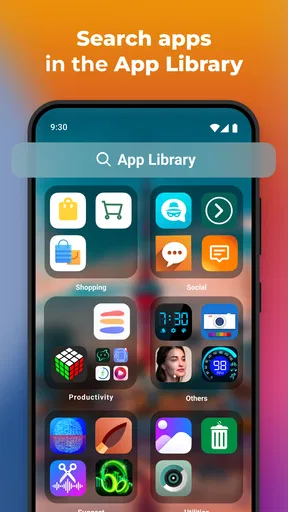
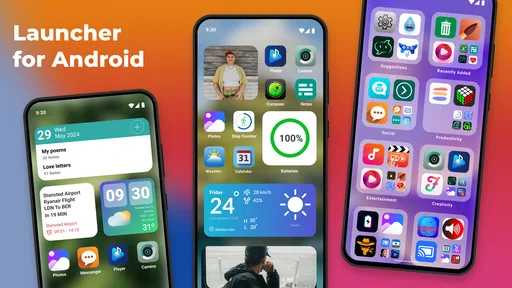
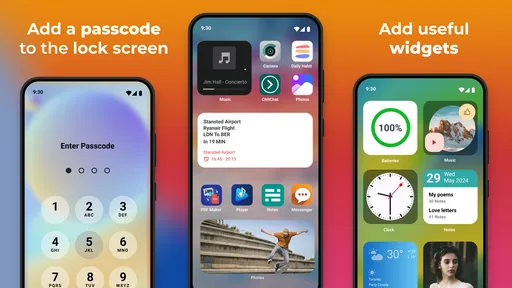
 Analysis by AppCompare
I’d start with a simple question: what do I want my phone to feel like when I pick it up? Maybe the home screen is cluttered, the default icons feel dull, or I want a more personal look without rebuilding everything from scratch. That is the appeal of Launcher and Themes: it gives Android users a way to change the surface of their phone and make everyday navigation feel more like their own.
It is a free personalization app from Cards, rated for Everyone, and it has attracted over 10 million installs. Its average rating is 4.6 from around 176,000 ratings. Those figures suggest it has found a sizable audience, but a launcher is a personal choice: how it feels on your particular phone matters more than popularity. The app is currently at version 1.3.12 and supports Android 5.0 and later.
Start with the phone you already have
Before changing anything, I’d take a quick look at the home screen as it is now. Which apps do I reach for most? Are there widgets I actually use, or are they taking up space without helping? Thinking this through first makes the theme choice more practical. A fresh appearance is nice, but the best setup is one that still makes common tasks easy.
That distinction is useful because a launcher is not the same thing as a wallpaper-only app. A wallpaper changes the background; a launcher can affect the broader home-screen layout and the way I browse apps. If I only want a new picture behind my icons, a simpler wallpaper tool may be enough. If I want the whole front of the phone to feel different, this app is more relevant.
The app is free to install, with in-app purchases ranging from $0.99 to $99.99 per item. I’d treat paid choices as optional rather than assume I need to spend money to test the basic idea. Since purchase options can vary in value, it makes sense to explore the available customization first and decide whether a particular extra is worth it to me.
From choosing a look to using it every day
First things first, downloading the Launcher and Themes app is a breeze. Just hop onto the Play Store or App Store, depending on your device, and it’s right there waiting for you. Once installed, you’re greeted with a clean, user-friendly interface. Seriously, even if you’re not tech-savvy, you’ll find your way around in no time.
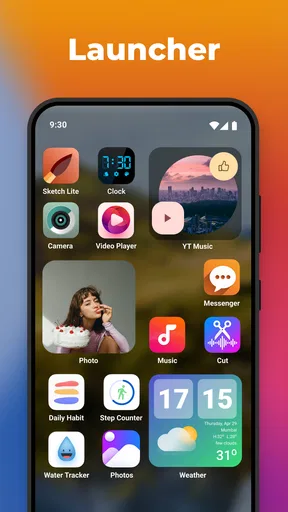
Now, onto the fun part - customization! The app offers a plethora of themes to choose from. Whether you’re into minimalistic designs or vibrant, eye-popping colors, there’s something for everyone. I personally went with a sleek, dark theme that made my icons pop like never before. And speaking of icons, you can customize those too! It’s like giving your phone a mini-makeover.
Worth Reading Before You Choose

EA SPORTS FC Mobile 26 Is a Bigger Football Game, but It Takes Time

Flipboard Shows What News Apps Must Do Beyond the Feed

Switching to Android Auto Means Rethinking Your Driving Routine

Google Calendar Makes a Crowded Week Easier to Manage

Ludo King Makes the Most of the Minutes Between Plans

Baby Panda World Brings Quick Play to Modern Phones, but Its Game Library Feels Busy
Build a setup around your routine
I find it helpful to choose a theme with the screen’s practical use in mind, not just its preview. A bold, high-contrast style can make app symbols easy to pick out quickly, while a quieter design may suit someone who wants the home screen to feel less busy. If I’m undecided, I’d try one look for ordinary use before changing several parts at once. That way, I can tell whether the theme itself works for me or whether a particular icon or layout is the part that feels off.
One realistic use case is a busy morning. I might want my calendar and weather visible, then keep the apps I open before leaving home easy to reach. After arranging the screen, I can check whether the new look makes those steps simpler or merely prettier. A theme that hides useful contrast or makes familiar icons harder to recognize is not a win, even if it looks polished.
Widgets, gestures, and the app drawer
One of the standout features of Launcher and Themes is its seamless integration with widgets. You can add, remove, and customize widgets with just a few taps. It’s super handy for quick access to your calendar, weather updates, or even your favorite social media apps.
The app also offers gesture controls, which are a game-changer. Imagine swiping up with two fingers to launch your favorite app or double-tapping the screen to lock your phone. It’s all about making your smartphone experience smoother and more intuitive.
Another cool feature is the app drawer customization. You can sort apps by name, size, or installation date. Plus, hiding apps you don’t want others to see is just a tap away. Privacy, check!
These controls are most useful when they solve a repeated small annoyance. For example, sorting by name can help when I’m trying to find an app among many installed choices, while sorting by installation date can make a recently added app easier to spot. I’d test a gesture on an empty part of the screen and make sure it feels natural before building a habit around it. A shortcut only saves time if I can remember it and trigger it reliably.
Where the handoffs matter
A launcher sits between me and the apps I open, so the transition from setup to normal phone use is the real test. Widgets can bring information onto the home screen, but tapping one still hands me off to the relevant app for the full task. I’d keep the widgets I glance at often and remove those that send me into apps I rarely use; otherwise, the home screen can become a collection of distractions rather than a useful starting point.
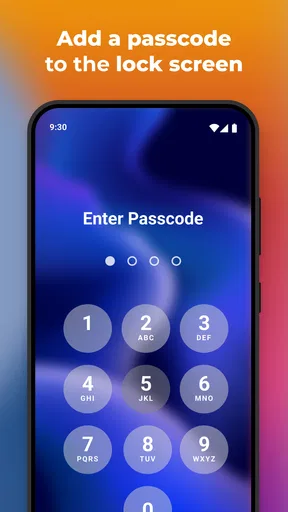
The same goes for the app drawer. Hiding an icon can make a screen look cleaner, but it also adds a step when I need that app. I’d use hiding for items I seldom open, not for something I need in a hurry. It is a modest organizational tool, not a substitute for protecting sensitive information with the phone’s own security features.
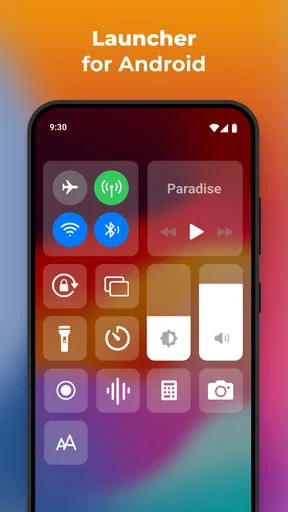
There is also a handoff back to the phone’s usual controls. A launcher changes the home-screen experience, but it does not replace every part of Android. I would keep expectations focused on the interface and navigation rather than expect a new theme to change how every app looks or works. That boundary helps avoid disappointment when an app opens with its own design.
Performance in ordinary use
Performance-wise, Launcher and Themes holds up pretty well. It’s lightweight, which means it doesn’t hog your phone’s resources. I didn’t notice any lag or slowdowns, even when switching between multiple themes and widgets. That’s always a plus in my book.
Battery life can be a concern with launchers, but this app seems to manage resources efficiently. I didn’t see any significant battery drain, which is a relief if you’re always on the go like me.
Even so, I’d judge performance over a normal day rather than only during setup. Theme browsing and repeated rearranging are not the same as unlocking the phone, opening a few apps, and returning home. If the phone feels less responsive after a change, I’d simplify the screen first: remove widgets I do not use and undo any layout choices that make navigation awkward. That is a more useful test than assuming every slowdown comes from the launcher itself.
How it compares with other ways to personalize
Compared with changing only the wallpaper, a launcher offers a broader home-screen makeover, with themes, icon customization, widgets, gestures, and app-drawer organization in the same experience. That breadth is its main draw for someone who wants several parts of the interface to feel coordinated. The trade-off is that there are more choices to make, and a setup that looks cohesive can take a little experimentation.
A phone’s built-in personalization options may be the better choice if I only want a small change or prefer to keep the default navigation exactly as it is. They can also be a sensible starting point for anyone who does not want to learn a different home-screen workflow. On the other hand, if I want to adjust the app drawer or try custom gestures as well as a new look, this app offers a more focused route than swapping wallpapers one by one.
I would also compare it with a highly configurable launcher only if I know I want to fine-tune many details. This app’s appeal is a more approachable mix of ready-made themes and practical home-screen controls, rather than an invitation to spend hours rebuilding every part of the interface. For most people, that balance is a strength; for a meticulous tinkerer, it may feel less satisfying than a tool built around deep manual control.
What could be improved
Of course, no app is perfect. While Launcher and Themes offers a lot, there are a few areas that could use some polishing. For instance, while the free version is quite generous, it does come with ads. They aren’t too intrusive, but if you’re someone who prefers a clean experience, you might want to consider the premium version.
Additionally, while there are tons of themes, some users might find the variety a bit overwhelming. A more curated selection could help users decide faster. But hey, having too many options isn’t the worst problem to have, right?
That abundance makes a simple selection method worthwhile: shortlist a few designs, compare how readable their icons look at a glance, then stop browsing once one fits your routine. Endless switching can turn a quick refresh into a chore. I’d also consider whether ads interrupt the way I use the app before paying for anything; the free starting point makes it possible to decide based on my own tolerance rather than committing immediately.
This is not the right pick for someone who wants a completely unchanged phone, dislikes ads, or expects every screen in every app to adopt one theme. It may also be a poor fit if I depend on a very specific default launcher behavior and do not want to adjust how I return to or organize the home screen. In those cases, a wallpaper change or the phone’s existing settings may deliver the desired result with less disruption.
Who will get the most from it
I’d recommend trying it if the home screen feels stale and I want to change more than the background, but still want customization to stay approachable. It suits people who enjoy experimenting with themes, want widgets close at hand, or would benefit from a tidier app drawer. The fact that it is free to install also makes it easier to explore before deciding whether optional purchases make sense.
I’d be more cautious if I rarely change my phone’s appearance, rely on a familiar layout for speed, or are already happy with the built-in tools. A launcher becomes part of a daily habit, so even attractive customization is not worthwhile if it makes basic navigation slower. I would start with one theme and a small number of changes, then keep only what genuinely improves the way I use the phone.
Final Thoughts
Overall, Launcher and Themes is a solid choice for anyone looking to spruce up their phone’s interface. It’s packed with features that are both fun and functional. Whether you’re a customization newbie or a seasoned pro, this app offers something for everyone.
So, if you’re ready to give your smartphone a fresh look and feel, go ahead and give it a shot. It’s one of those apps that once you start using, you’ll wonder how you ever lived without it. Happy customizing!
Pros
- Highly customizable interface options.
- Smooth performance with minimal lag.
- Wide variety of themes available.
- Frequent updates with new features.
- User-friendly and intuitive design.
Cons
- Some themes require in-app purchases.
- Occasional ads can be intrusive.
- Limited widget customization options.
- May drain battery faster on older devices.
- Compatibility issues with certain apps.
FAQs for Launcher and Themes
What features make this launcher stand out from others?
This launcher offers a unique blend of customization and performance. It provides a wide range of themes, icon packs, and widgets that allow users to personalize their home screen to match their style. Additionally, it boasts smooth transitions and minimal impact on battery life, making it both visually appealing and efficient.
Is the launcher compatible with all Android devices?
The launcher is designed to be compatible with most Android devices running version 5.0 and above. However, some features may vary depending on the specific hardware and software configurations of your device. It’s always a good idea to check the app’s compatibility notes in the Play Store before downloading.
How does the app affect battery life and device performance?
The launcher is optimized to be lightweight and efficient, minimizing its impact on battery life and overall device performance. It uses advanced algorithms to manage resources effectively, ensuring smooth operation without draining your battery. Users typically report no significant decrease in performance after installation.
Are there in-app purchases or ads within the launcher?
The launcher is free to download and use, but it does offer in-app purchases for additional themes and premium features. While it includes some ads to support development, these are minimal and non-intrusive. Users can opt for an ad-free experience by purchasing the premium version.
Can I use my own images and designs for themes?
Yes, the launcher supports custom themes, allowing you to use your own images and designs. You can easily upload images from your gallery to create personalized wallpapers, icons, and widgets, giving you complete creative control over the look of your home screen.


